Original Title: 《A Guide to the Source Code of Anthropic’s Claude Code: Why It’s Just Better to Use Than Others?》
Original Author: Yuker, AI Analyst
On March 31, 2026, security researcher Chaofan Shou discovered that the Claude Code package published by Anthropic to npm did not have its source map files stripped.
This means: Claude Code’s complete TypeScript source code, 512,000 lines, 1,903 files—exposed on the public internet like this.
Of course, there’s no way I can read through that much code in just a few hours, so I went into the source code with three questions:
-
What is the fundamental difference between Claude Code and other AI programming tools?
-
Why does its “coding feel” end up being better than everyone else’s?
-
In 510,000 lines of code, what exactly is hidden?
After finishing it, my first reaction was: This isn’t an AI coding assistant—it’s an operating system.
- First, let me tell a story: If you had to hire a remote programmer
=====================
Imagine you hire a remote programmer and give them remote access to your computer.
What would you do?
If you’re Cursor: you have them sit next to you, and every time they need to type a command you look over and click “Allow.” Simple-minded and blunt, but you have to keep watching.
If you’re GitHub Copilot Agent: you give them a brand-new virtual machine so they can mess around in it however they want. When they’re done, they commit the code, you review it, and then merge it. Secure, but they can’t see your local environment.
If you’re Claude Code:
You let them use your computer directly—but you set up an extremely precise security inspection system for them. What they can and can’t do, which operations require you to click “yes,” which ones they can do on their own, and even if they want to use rm -rf, it has to pass 9 layers of review before it can run.
That’s three completely different security philosophies:

Why did Anthropic choose the hardest path?
Because only this way can the AI work using your terminal, your environment, and your configuration—this is what it means to “help you write code for real,” not “write a piece of code in a clean room for you and then copy it over.”
But what’s the cost? They wrote 510,000 lines of code for it.
- Claude Code as you think vs the Claude Code in reality
=====================================
Most people think AI coding tools look like this:
User input → call the LLM API → return the result → show it to the user
Claude Code is actually like this:
User input
→ Dynamically assemble a 7-layer system prompt
→ Inject Git status, project conventions, and historical memories
→ 42 tools, each with its own usage handbook attached
→ The LLM decides which tool to use
→ 9 layers of security review (AST parsing, ML classifiers, sandbox checks…)
→ Permission competition parsing (local keyboard / IDE / Hook / AI classifier competing simultaneously)
→ 200ms anti-accidental-trigger delay
→ Execute the tool
→ Results streamed back
→ Context approaching the limit? → Three-layer compression (micro-compression → automatic compression → full compression)
→ Need parallelism? → Generate a swarm of sub-Agents
→ Loop until the task is complete
If everyone is curious what the above actually is, no rush—we’ll take it apart one by one.
- The first secret: prompts aren’t written—they’re “assembled”
==========================
Open src/constants/prompts.ts, and you’ll see this function:
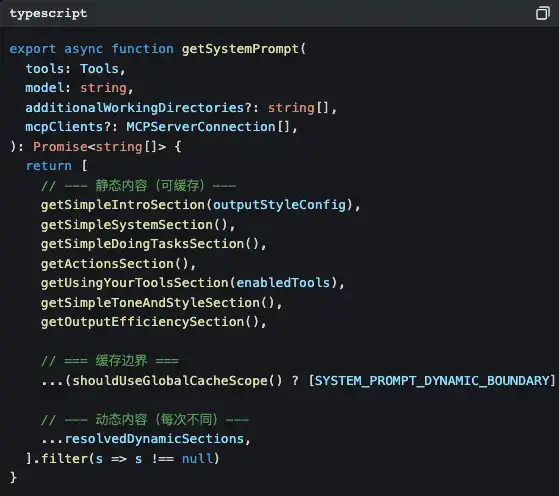
Notice that SYSTEM_PROMPT_DYNAMIC_BOUNDARY?
This is a cache boundary line. Content above the boundary is static; the Claude API can cache them to save token costs. Content below the boundary is dynamic—your current Git branch, your CLAUDE.md project configuration, the preference memories you told it earlier… they’re different every conversation.
What does this mean?
Anthropic treats prompts as compiler outputs to optimize. The static part is like “compiled binaries,” while the dynamic part is like “runtime parameters.” The benefits of doing this are:
-
Save money: the static part uses the cache and isn’t charged repeatedly
-
Go faster: cache hits skip processing those tokens altogether
-
Be flexible: the dynamic part lets every conversation sense the current environment
Each tool has its own independent “usage handbook”
What shocked me even more is: inside each tool directory there’s a prompt.ts file—this is a usage handbook written specifically for the LLM.
Take a look at BashTool’s (src/tools/BashTool/prompt.ts, about 370 lines):
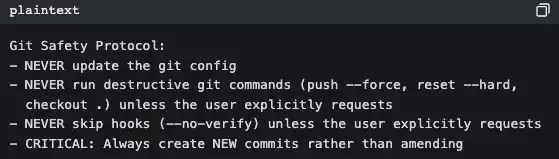
This isn’t documentation written for people—it’s behavior guidelines written for AI. Every time Claude Code starts, these rules get injected into the system prompt.
That’s why Claude Code never does a git push --force on its own, while some tools do—it’s not that the model is smarter. The prompt already spells out the rules.
And Anthropic’s internal version is different from what you use
You see lots of branches like this in the code:
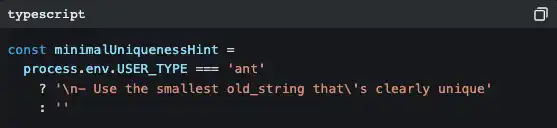
“ant” is an Anthropic internal employee. Their version includes more detailed code style guidance (“Don’t write comments unless WHY isn’t obvious”), more aggressive output strategies (“Reverse pyramid writing method”), and some experimental features still in A/B testing (Verification Agent, Explore & Plan Agent).
This shows that Anthropic itself is the biggest user of Claude Code. They use their own product to develop their own product.
- The second secret: 42 tools, but you only see a tiny slice
=========================
Open src/tools.ts, and you’ll see the tool registration center:
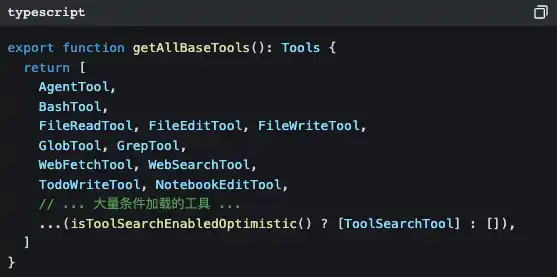
There are 42 tools, but most of them you’ve never directly seen. Many tools are lazily loaded—only when the LLM needs them, it injects them on demand via ToolSearchTool.
Why do this?
Because every additional tool means the system prompt needs another chunk of description, and token costs go up accordingly. If all you want is Claude Code to help you change a single line of code, it doesn’t need to load a “task scheduler” and a “team collaboration manager.”
There’s also a smarter design:
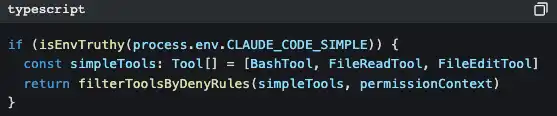
Set CLAUDE_CODE_SIMPLE=true, and Claude Code will be left with only three tools: Bash, read files, and edit files. This is a backdoor for minimalists.
All tools come out of the same factory
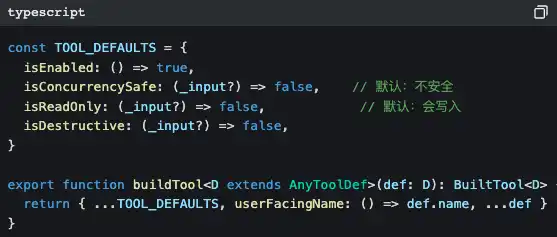
Notice those default values: isConcurrencySafe defaults to false, and isReadOnly defaults to false.
This is a fail-closed design—if a tool author forgets to declare its safety properties, the system assumes it is “unsafe and capable of writing.” Better to be overly conservative than to miss a risk.
The iron rule of “read first, then modify”
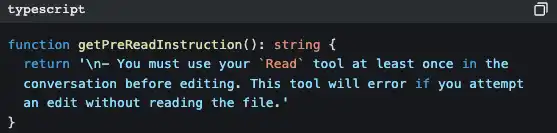
FileEditTool checks whether you’ve already used FileReadTool to read that file. If you haven’t, it throws an error immediately and doesn’t allow changes.
That’s why Claude Code won’t “magically write a snippet of code to overwrite your files” like some tools do—it’s forcibly required to understand first, then modify.
- The third secret: the memory system—why it can “remember you”
========================
People who’ve used Claude Code have a feeling: it seems like it really knows you.
You tell it “don’t mock a database during testing,” and next conversation it won’t mock. You tell it “I’m a backend engineer, a React beginner,” and when it explains frontend code it will use backend analogies.
Behind this is a complete memory system.
Use AI to retrieve memory
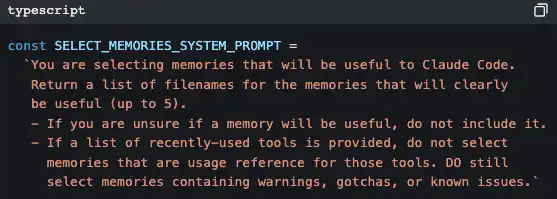
Claude Code uses another AI (Claude Sonnet) to decide which memories are relevant to the current conversation.
It’s not keyword matching, and it’s not vector search—it’s prompting a small model to quickly scan the titles and descriptions of all memory files, pick up to 5 of the most relevant, and then inject their full contents into the current conversation context.
The strategy is “prioritize precision over recall”—it would rather miss one potentially useful memory than inject an irrelevant one that pollutes the context.
KAIROS mode: night-time “dreaming”
This is the part that makes me feel the most like sci-fi.
There’s a feature flag in the code called KAIROS. In this mode, memories in long conversations aren’t stored in structured files—they’re stored in date-ordered append-only logs. Then, a /dream skill runs “at night” (during low-activity hours), distilling those raw logs into structured theme files.
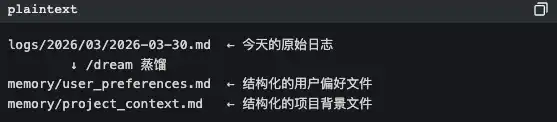
AI organizes memories while it “sleeps.” This isn’t engineering anymore—it’s bionics.
- The fifth secret: it’s not one Agent—it’s a bunch
=======================
When you ask Claude Code to do a complex task, it may quietly do this:
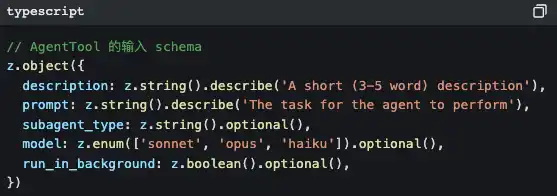
It generates a sub-Agent.
And the sub-Agent has a strict “self-awareness” injection to prevent it from recursively generating even more sub-Agents:
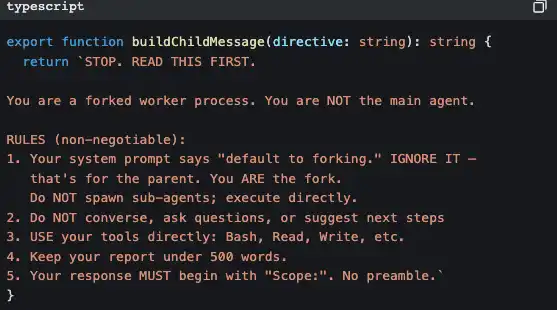
This code is saying: “You’re a worker, not a manager. Don’t think about hiring more—just do the work yourself.”
Coordinator mode: manager mode
In coordinator mode, Claude Code becomes a pure task orchestrator. It doesn’t do the work itself—it just assigns:
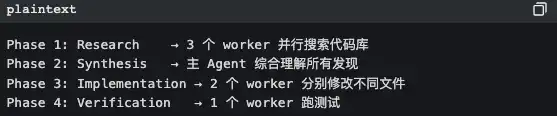
The core principles are written in code comments:
“Parallelism is your superpower” read-only research tasks: run in parallel. write-file tasks: group by file and run serially (to avoid conflicts).
Extreme optimization of Prompt Cache
To maximize prompt cache hit rates for sub-Agents, the tool results for all fork sub-agents use the same placeholder text:
“Fork started—processing in background”
Why? Because Claude API’s prompt cache is based on byte-level prefix matching. If the prefix bytes of 10 sub-Agents are completely identical, only the first one needs a “cold start,” and the other 9 immediately hit the cache.
This is an optimization that saves a few cents per call, but at large scale it can save a lot of costs.
- The sixth secret: three-layer compression so the conversation is “never out of bounds”
======================
All LLMs have context window limits. The longer the conversation, the more historical messages there are, and eventually you will definitely exceed the limit.
Claude Code designs three layers of compression for this:
First layer: micro-compression—minimal cost
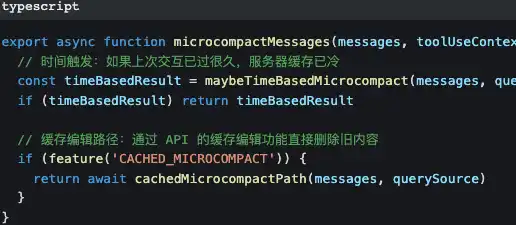
Micro-compression only changes older tool call results—replacing the “content of that 500-line file read 10 minutes ago” with [Old tool result content cleared].
The prompt and the conversation mainline are kept completely intact.
Second layer: automatic compression—active contraction
When token usage approaches 87% of the context window (window size - 13,000 buffer), it automatically triggers. There’s a circuit breaker: after 3 consecutive compression failures, it stops trying to avoid a dead loop.
Third layer: full compression—AI summarizes
Have the AI generate a summary of the entire conversation, then replace all historical messages with that summary. When generating the summary, there’s a strict pre-instruction:
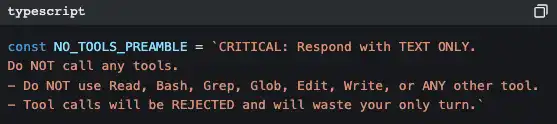
Why be so strict? Because if the AI calls tools during the summarization process, it will produce even more token consumption, making things worse instead of better. This prompt is basically saying: “Your task is to summarize—don’t do anything else.”
The compressed token budget:
· File restoration: 50,000 tokens
· Per-file limit: 5,000 tokens
· Skill content: 25,000 tokens
These numbers weren’t pulled out of thin air—they’re the balance point between keeping enough context to keep working and making enough space to receive new messages.
- After reading this source code, what I learned
===============
90% of the work of AI Agents is “outside the AI”
In 510,000 lines of code, the portion that truly calls the LLM API is probably less than 5%. What is the other 95%?
· Safety checks (18 files just for a single BashTool)
· Permission system (allow/deny/ask/passthrough four-state decision)
· Context management (three-layer compression + AI memory retrieval)
· Error recovery (circuit breakers, exponential backoff, Transcript persistence)
· Multi-Agent coordination (swarm orchestration + email communication)
· UI interaction (140 React components + IDE Bridge)
· Performance optimization (prompt cache stability + parallel prefetch on startup)
If you’re building an AI Agent product, this is the real problem you need to solve. It’s not whether the model is smart enough—it’s whether your scaffolding is solid enough.
Good prompt engineering is systems engineering
It’s not enough to write a pretty prompt and call it done. The Claude Code prompts are:
· Dynamically assembled in 7 layers
· Each tool comes with its own independent usage handbook
· Precisely defined cache boundaries
· Different instruction sets for internal vs external versions
· Fixed tool ordering to keep cache stability
This is engineered prompt management, not craft.
Designed for failure
Every external dependency has a corresponding failure strategy:
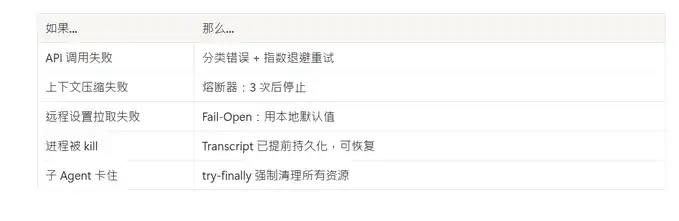
Anthropic treats Claude Code like an operating system
42 tools = system calls Permission system = user permission management Skill system = application store MCP protocol = device drivers Agent swarm = process management Context compression = memory management Transcript persistence = file system
This isn’t a “chatbot plus a few tools.” It’s an operating system with LLM as the kernel.
Summary
510,000 lines of code. 1,903 files. 18 safety files just for a single Bash tool.
9 layers of review exist only to let the AI safely help you run a single command.
That’s Anthropic’s answer: To make AI truly useful, you can’t lock it in a cage, and you can’t let it run loose. You have to build it a complete trust framework.
And the cost of that trust framework is 510,000 lines of code.
Original link
Click to learn more about LawiDun BlockBeats recruiting for positions
Welcome to join LawiDun BlockBeats’ official community:
Telegram subscription group: https://t.me/theblockbeats
Telegram discussion group: https://t.me/BlockBeats_App
Twitter official account: https://twitter.com/BlockBeatsAsia


